Color Ramp Converter
Turn Blender’s color ramp node into a custom node group with inputs for each color stop.
Blender Addon Released
I created this Blender addon because I often needed more control over the default color ramp nodes in my own projects and found myself repeating the same setup steps.
What is Color Ramp Converter?
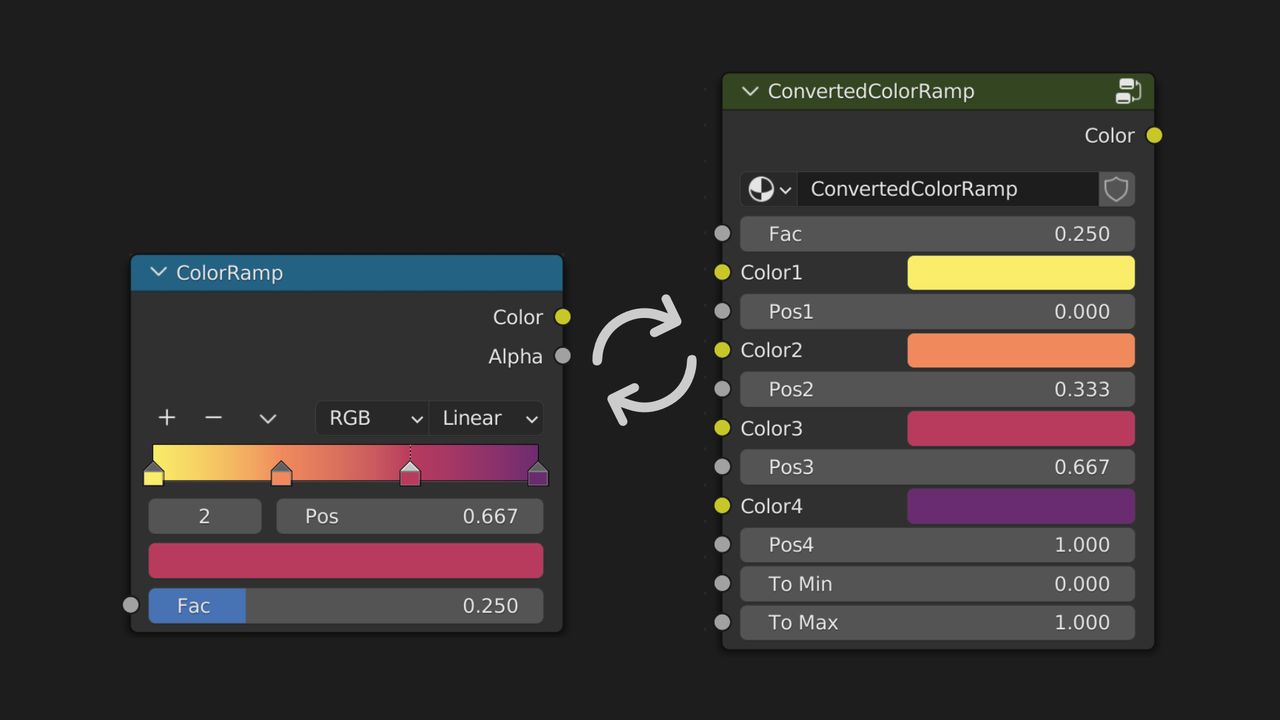
Color Ramp Converter is a Blender addon that allows the quick creation of custom node groups from Color Ramp nodes, with more input control than the default node.
Blender’s default Color Ramp node has no inputs for the color stops, whereas the custom node group created by this addon has separate inputs for each one. Turning color stops into separate inputs can be useful when you need to drive or adjust them more directly in a node setup. This provides more control in your node setup.
The addon also provides convenience features for converting back and forth between Color Ramp nodes and the custom node group and automatically preserving links to other nodes in your node tree. This means you can convert a Color Ramp node into a custom node group and back again without losing any connections to other nodes quickly without having to manually reconnect them.
Long Term Compatibility
I chose to only use Blender’s built-in nodes for the custom node groups when implementing this addon, so your files remain compatible with other Blender users who do not have the addon installed. This means that if you share your files with other users, they will still be able to open and use them without needing to install the addon.
This approach is intended to reduce compatibility problems and improve the likelihood that files continue to work in future Blender versions, although compatibility cannot be guaranteed as Blender evolves.
Example
One good example is when you create masks with multiple color stops. You can easily control what textures and color values you want to use for each of the masks, and you can also drive them with other nodes in your setup.

Tip: You can select one or more Color Ramp nodes in your node tree and convert them into a custom node group with a single click; and convert them back just as easily. If you use this feature often, you can assign it to the favorites menu for even quicker access.
Where can I get it?
Color Ramp Converter is available on the following marketplaces:
Features & Documentation
A full set of documentation about features, installation process and usage can be found here: documentation